
Your month-end close now takes 14 days, yet the margin report from finance doesn't match the one from operations. The controller exports data from one system, the operations manager adjusts it in another, and you still can't explain which number lenders, investors, or the ownership team should trust.
That's the moment an old system stops being an inconvenience and starts becoming a financial liability. Manual workarounds consume staff capacity, delayed reporting slows decisions, and unreliable job or customer margins can distort pricing before anyone notices. Upgrading a system is a capital allocation decision first and an IT project second.
The question you're trying to answer is simple: will a new system create enough cash visibility, control, and operating capacity to justify the cost and disruption? The answer won't come from a vendor demo. It comes from measuring the cost of staying put, choosing a realistic path, and holding leadership accountable for adoption.
Table of Contents
- The Moment an Old System Starts Costing You Money
- Reading the Warning Signs Before You Sign Anything
- Choosing the Right Path for Your Growth Stage
- Building a Vendor Shortlist That Actually Filters
- Mapping the Migration So Nothing Slips Between Teams
- Testing, Pilot, and Rollout Without Freezing Operations
- Change Management as a Leadership Discipline
The Moment an Old System Starts Costing You Money
Owners often wait for a dramatic failure before approving an upgrade. That's a mistake. The more expensive condition is a system that still functions, but forces people to compensate for it every day.
A finance team may rekey invoices, reconcile bank activity in spreadsheets, rebuild project margins manually, and delay management reporting until the numbers are patched together. Those hours inflate overhead, but the larger cost comes from decisions made with stale or conflicting information. A contractor may accept a low-margin job because historical cost data is incomplete. A distributor may carry the wrong inventory because purchasing and sales use different records. A professional services firm may miss a billing issue because time, contract, and invoicing data don't connect.
The financial case starts with three prompts:
- Where is bad data consuming cash? Identify delayed billing, excess inventory, missed change orders, underpriced work, and overdue receivables caused or concealed by weak information.
- How many days and staff hours does the current process require? Count close days, manual reconciliations, spreadsheet preparation, duplicate entry, and time spent investigating discrepancies.
- Which decision can leadership not make confidently? Name the pricing, hiring, purchasing, expansion, or financing decision that depends on information the current system can't provide.
CFO rule: Don't approve an upgrade because the software looks outdated. Approve it when the cost of poor visibility exceeds the cost of changing the system.
The computing industry's history shows why this problem keeps growing. Milestones such as OS/360 in 1966, UNIX development in 1969, the World Wide Web in 1991, and commercial internet use in 1995 moved businesses from isolated tools toward interconnected platforms. Modern upgrades can involve databases, security, mobile access, analytics, integrations, training, and reporting layers, not merely a version change. The historical progression is documented in research on why software upgrades fail.
A useful companion resource on converting accrual to cash can help owners separate accounting presentation from actual cash performance. For broader context on business growth through modernization, look for the operating constraints your current technology creates as the company expands.
Reading the Warning Signs Before You Sign Anything
Start with a needs assessment, not a vendor list. Your team's complaints are useful only after you translate them into business consequences.
Create a simple issue register with five columns: complaint, affected process, financial consequence, frequency, and owner. “Reports take forever” becomes delayed management reporting and additional close days. “We enter the same customer twice” becomes duplicate labor and a higher risk of billing or collection errors. “We can't see inventory” becomes purchasing uncertainty, stockouts, excess holdings, or production disruption.
Interview teams separately. Group discussions encourage the loudest department to define the problem for everyone else.
Ask each team a different question
The controller should describe close bottlenecks, reconciliations, audit support, and reporting adjustments. Sales operations should explain quote-to-order handoffs, customer records, and commission data. Warehouse or field leaders should map receiving, fulfillment, job costing, returns, and the points where employees leave the system to complete work.
Then ask each person to show you the process. A live screen-share often reveals hidden spreadsheets, email approvals, shared folders, file drops, and manual imports that never appear in an executive requirements document.
Score each problem against what ownership already cares about:
| Decision criterion | What to measure |
|---|---|
| Cash flow | Billing delays, collection visibility, purchasing friction |
| Margin protection | Job, project, product, or client profitability confidence |
| Reporting cadence | Close length, report preparation, management review timing |
| Control | Approval gaps, audit trail weakness, manual adjustments |
| Capacity | Repetitive staff work and dependency on one knowledgeable employee |
Weight the criteria before you see a demo. If cash visibility matters most, it should carry more weight than a cosmetic dashboard. If project margin is the critical issue, test cost capture and change-order handling instead of admiring the interface.
Finish with a one-page cost of staying memo. State the operational problem, the hours and days involved, the decisions affected, the risk of delay, and the outcome the company needs. Don't claim savings you haven't validated. Use ranges qualitatively where the evidence is incomplete, then refine them during discovery.
To evaluate the investment properly, use a discounted payback period formula rather than relying only on a vendor's implementation estimate. The memo should justify investigating the upgrade before it justifies buying anything.
Choosing the Right Path for Your Growth Stage
For a business between $10M and $100M in revenue, there are three credible paths. The wrong choice usually creates years of avoidable cost.
| Path | 5-Year Cost Range | Time to Reliable Reporting | Internal Resourcing | Best Fit |
|---|---|---|---|---|
| Build a custom solution | Highly variable and difficult to control | Often longer because the reporting model must be created | Heavy product, technical, and process ownership | Highly regulated or operationally unique businesses |
| Configure an existing mid-market platform | Predictable relative to custom development | Usually faster when core workflows already fit | Moderate, with strong process-owner involvement | Most established SMBs with identifiable requirements |
| Replace with a best-fit SaaS suite | Recurring subscription plus implementation and migration work | Fastest when data and integrations are disciplined | Moderate during selection, migration, and adoption | Firms that have outgrown fragmented or inflexible systems |
Configure means adapting an established platform through settings, workflows, permissions, and standard extensions. Build means creating substantial software specific to your company. Replace means moving to a different platform because the current architecture can't support the business economically.
For most SMBs in this revenue range, configure or replace is the sound default. Existing platforms bring tested accounting structures, security controls, reporting tools, and integration patterns. That doesn't make implementation easy, but it reduces the amount of business logic your team must invent and maintain.
Use this decision rule: if more than 40% of desired functionality requires custom development, the platform fit is wrong and replacement is likely the cheaper long-term path. That 40% threshold is a management filter, not a guarantee of savings. The point is to force an honest conversation about whether you're buying a platform or funding a permanent software product.
Build only when the business has a distinctive operating model, regulatory constraint, or process that standard products cannot support. Choosing build to “keep optionality” usually means the team hasn't made a hard platform decision. Optionality also carries maintenance, documentation, security, and talent risk.
Building a Vendor Shortlist That Actually Filters
A vendor selection process should eliminate weak options quickly. Ten demos create noise. A shortlist of three to five finalists creates comparable evidence.
Build the scorecard before vendors present. Weight each criterion according to the cost of failure, not the ease of demonstration. A polished dashboard shouldn't outweigh a weak integration with the system that drives billing or job costs.
| Criterion | Weight (%) | Vendor A Score (1-5) | Vendor B Score (1-5) | Vendor C Score (1-5) |
|---|---|---|---|---|
| Financial close speed | 25 | |||
| Reporting depth | 20 | |||
| Integration with top three systems | 20 | |||
| Total five-year cost | 20 | |||
| Implementation partner quality | 15 |
Ask every finalist to demonstrate the same workflows using your terminology. For a construction company, that may include estimating, committed costs, change orders, work-in-progress reporting, and job-level margin. A useful reference on construction job costing software can help frame the questions, but your own chart of accounts and operating process must drive the evaluation.
Cap sales time at a fixed window. Require a written response to your top requirements, a sample implementation plan, and a complete cost view that includes licensing, integrations, migration, training, support, and future modules. Don't accept “we'll confirm that during implementation” for a requirement tied to cash, close, compliance, or customer service.
Call two references for every finalist. Choose companies with similar size, transaction complexity, integration needs, and leadership structure. Ask what went wrong, what the partner underestimated, what internal role became overloaded, and which promised capability required a workaround.
Before signing, require clear contract language covering:
- Data portability: You retain practical access to your data in a usable format.
- Milestone payments: Fees align with accepted deliverables, not only elapsed time.
- Training hours: The contract identifies included sessions, audiences, and materials.
- Support response: The provider defines response expectations for critical issues.
- Acceptance criteria: You can determine whether a configured workflow is ready.
Owners should know which vendor loses the deal if the top two priorities aren't met. If the team can't answer that, it hasn't built a filter. It has attended demos.
Mapping the Migration So Nothing Slips Between Teams
A migration plan that treats everything as a cutover-weekend problem is already behind. Run data, integration, and human work as parallel workstreams, with one accountable owner for every deliverable.
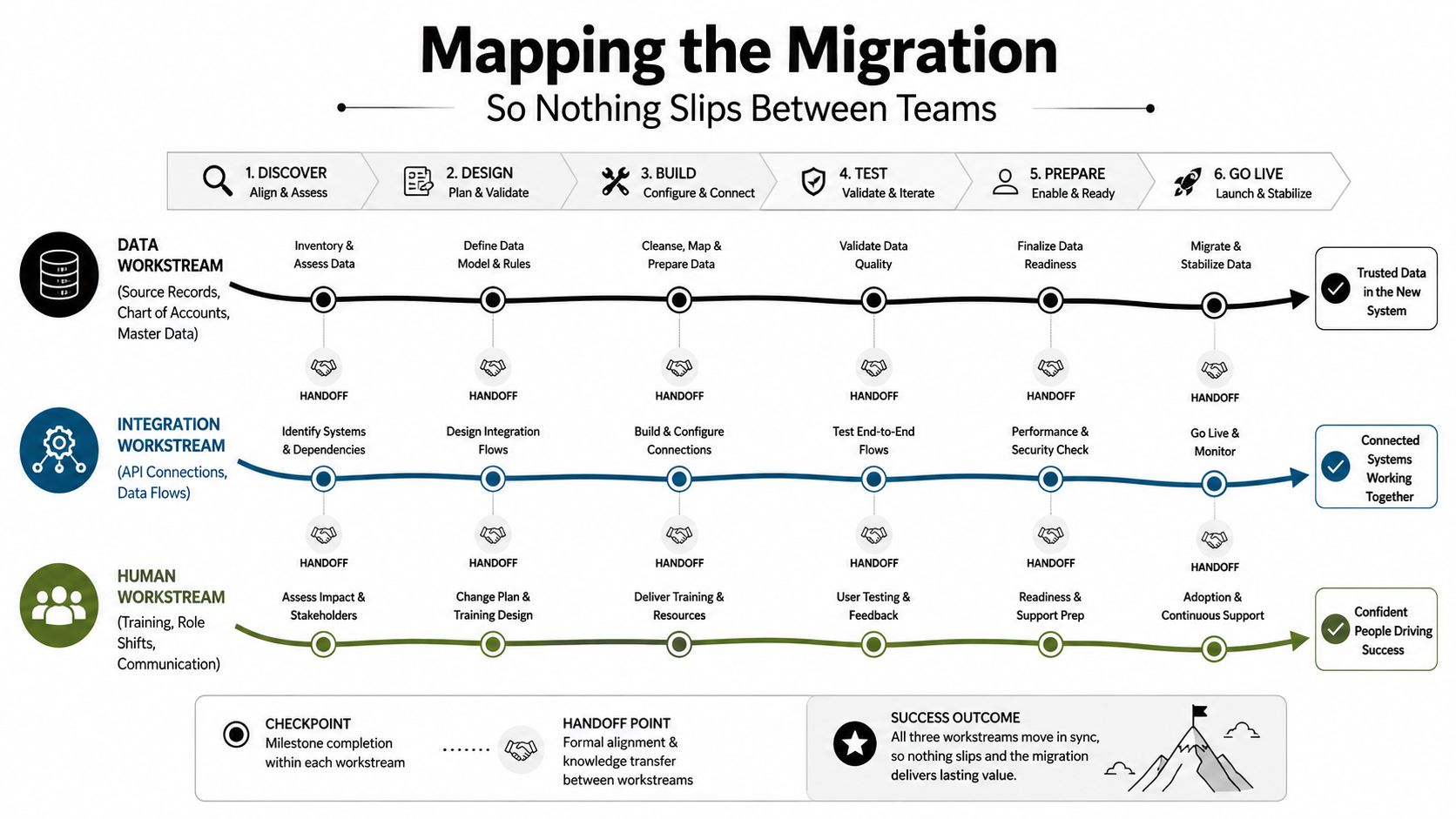
The data workstream
Inventory source records before anyone starts cleansing. Identify customers, vendors, employees, products, projects, open receivables, open payables, historical transactions, attachments, and reporting dimensions. Define the target chart of accounts and master-data ownership before migration scripts are written.
Cleansing means correcting duplicates, incomplete records, inconsistent naming, invalid classifications, and obsolete values. Decide what moves, what gets archived, and what must be rebuilt. A practical overview of Zynthoro's approach to data migration can help structure that inventory and validation conversation.
The integration workstream
Map every touchpoint, not just official APIs. Include bank feeds, CRM, payroll, e-commerce, payment processors, warehouse tools, estimating systems, file exchanges, scheduled reports, and internal scripts. For each connection, record the owner, data direction, frequency, failure response, and decision to retain, replace, or defer.
Hidden dependencies are a common reason upgrades fail. Research on upgrade failures identifies broken dependencies, changed behavior, new-version bugs, and incompatibility with legacy configurations as leading causes, making dependency mapping and rollback-tested staging essential according to the ACM-indexed study.
The human workstream
Assign process owners for finance, sales, purchasing, warehouse, operations, and reporting. Lock role definitions early. A person who approves invoices in the old system may need a different permission set in the new one.
Tie all three workstreams to a shared cutover date and review dependencies weekly. Your project tracker should show the deliverable, accountable owner, due date, acceptance test, and blocker. If a task disappears into a handoff, it doesn't have an owner.
For finance teams, connect the migration plan to data analytics for finance so the reporting model is designed before the data arrives. Clean data without usable management reporting is just organized history.
Testing, Pilot, and Rollout Without Freezing Operations
A regional business unit or single legal entity makes a better pilot than the entire company. It creates a controlled environment where the team can test transactions, reporting, permissions, integrations, and user behavior without putting every customer and department at risk.
A representative distributor, for example, might pilot one entity while the remaining operation continues on the legacy platform. The finance lead selects a period with ordinary purchasing, sales, returns, payroll, bank activity, and month-end adjustments. The pilot isn't a showcase. It's an attempt to make the new system fail safely before production depends on it.
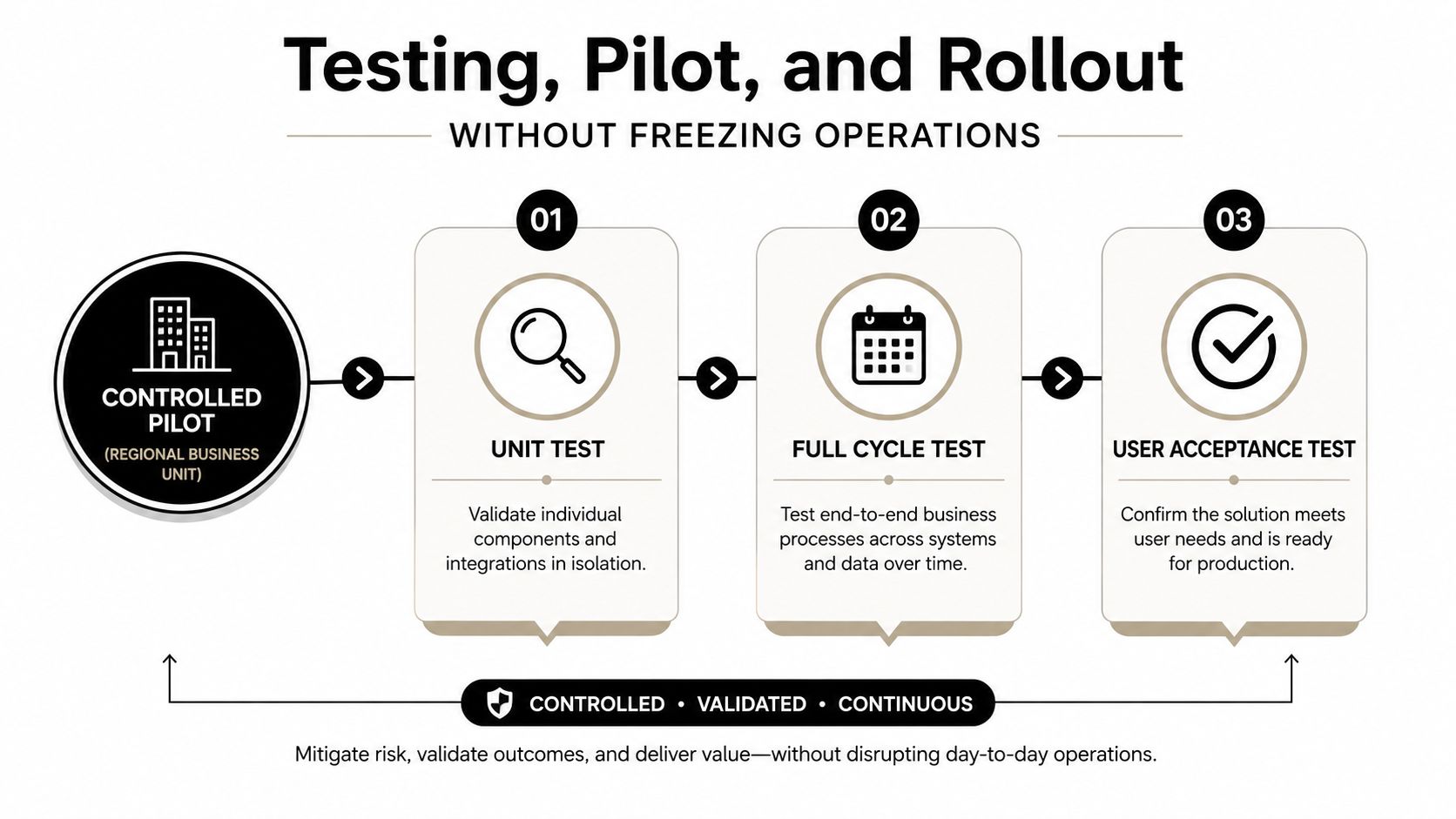
Run three passes:
- Unit testing: Test each configured transaction, including normal, exception, approval, reversal, and correction scenarios.
- Full-cycle testing: Run a complete close in the pilot entity, from source transactions through reconciliations and management reports.
- Parallel testing: Run the pilot against the legacy system for at least one full month and reconcile variances daily.
A more than 2% unexplained variance rate means the pilot isn't ready, based on the control threshold established for this rollout. Investigate the cause rather than averaging the difference away. A variance can come from timing, mapping, opening balances, configuration, or a genuine defect.
Upgrade downtime isn't one block of lost time. SAP guidance separates the overall project window from business downtime and identifies ramp-down, backups, final tests, post-upgrade transports, manual adjustments, and validation as distinct activities in its guidance on minimizing SAP ERP upgrade downtime.
Schedule the cutover during a low-volume week, with finance leadership present. Hold a daily 15-minute war room for the first two weeks, then meet weekly for a month. Track adoption, support tickets, close-time metrics, reconciliation status, and unresolved defects. Leadership should make decisions quickly, not absorb every technical detail.
Use a 13-week cash flow model during rollout so the business can see upcoming cash commitments while reporting stabilizes.
The control process matters because intentional software changes, including upgrades, have accounted for 66% to 86% of service unavailability in the cited research, and separate research estimated Type 1 faults in 15.2% of upgrades and Type 4 faults in 16.8% in the software-failure research. The practical response is staged deployment, fault classification, and post-cutover monitoring, not optimism.
The rollout sequence is also a leadership decision. Industry summaries report that roughly 50% to 75% of ERP implementations exceed budget, miss schedule, or fail to deliver expected benefits in the ERP implementation failure summaries. A 640-project audit found that only 27% met their original go-live date, with a median schedule overrun of 5.3 months, equal to a 41% extension of the planned timeline in the project audit summary. Build contingency into the plan before the vendor asks for it.
Change Management as a Leadership Discipline
Employees rarely resist a system because they dislike technology in the abstract. They resist unclear workflows, lost control, extra approvals, unfamiliar reports, and the fear that mistakes will become visible without support.
Treat adoption as an operating-control problem. Before go-live, identify three groups:
- The silent majority: They'll adapt if the workflow is clear, the training is relevant, and someone answers questions quickly.
- The vocal champions: They can test early workflows, find practical defects, and help demonstrate wins to peers.
- The active resistors: They may fear loss of authority, exposure of manual workarounds, or a change in how performance is measured.
Assign a named owner to each group. The controller usually owns finance adoption. An operations lead owns daily users. An executive sponsor resolves conflicts, removes blockers, and makes decisions when departments protect their old habits.
Make training role-specific
A generic presentation creates familiarity, not competence. Use a layered cadence:
- Pre-cutover demonstration: Run a focused 60-minute session showing the end-to-end workflow and the decisions that change.
- Sandbox practice: Give each role access to a controlled environment two weeks before launch, with realistic examples and required exercises.
- Floor walking: Keep super-users beside hesitant staff during the first 30 days, especially during month-end close.
Training must include failure recovery. Show users how to correct an invoice, reverse a journal entry, handle a rejected integration, search for an attachment, and escalate a problem. People gain confidence when they know what happens after they make a mistake.
The business should track adoption with the same discipline used for migration:
| Metric | Why it matters |
|---|---|
| Journal entry error rate | Shows whether finance users understand controls and workflows |
| Days to close | Reveals whether the new process improves reporting cadence |
| AR aging accuracy | Tests whether receivables data supports collection decisions |
| Login frequency by department | Identifies teams still working outside the platform |
| Support tickets by process | Separates training gaps from configuration defects |
Set a baseline before launch. If the journal-entry error rate rises above baseline by week three, pause optimization work and retrain before adding modules. New features won't repair a process people don't understand.
Post-go-live disruption deserves explicit planning. One industry summary of Panorama Consulting findings reports that 49% of organizations experienced operational disruption after ERP go-live, while 51% saw daily operations disrupted, including shipping delays, inventory mismatches, and financial reporting gaps in the ERP implementation failure summary. The response shouldn't be blame. It should be fast triage, clear ownership, and visible executive support.
A structured proven change management process can provide a useful reference for sequencing communication, training, reinforcement, and feedback. But the owner still has to make adoption part of performance management. If a department continues using shadow spreadsheets, the leadership team must decide whether the issue is a missing capability, insufficient training, or unwillingness to follow the agreed process.
Use a one-page leadership filter
Bring the upgrade decision into the next planning meeting with five scores:
- Cash visibility lag: How long does it take to see a reliable cash position?
- Close cycle length: How long does management wait for dependable results?
- Manual reconciliation hours: How much recurring capacity goes into proving the numbers?
- Integration fragility: How often do connected processes fail, break, or require intervention?
- Audit risk: How much depends on undocumented logic, spreadsheets, or individual memory?
Weight each dimension against revenue impact and mark the results green, yellow, or red. If three or more dimensions are red, treat the upgrade as a timing decision, not a theoretical possibility.
Match urgency to the path. A red close cycle combined with growth points toward replacement. A red integration score with a stable core suggests configuration. Custom build belongs only where neither vendor product fits and revenue exceeds $50M.
Set a 90-day window to charter a steering committee, retain an independent advisor if internal IT capacity is thin, and freeze new feature requests on the legacy system during evaluation. Continuing to customize a system you may replace wastes money and makes the migration harder.
Book a discovery call within two weeks. Bring the cost of staying memo, your five-dimension filter, the top three integration map, and the last close timeline. Those documents will tell you more about the right upgrade path than another generic software demo.
AmbitionCFO helps founder-led businesses with $10M to $100M in revenue evaluate ERP and reporting upgrades through a finance-first lens, with cash flow modeling, margin analysis, forecasting, KPI dashboards, and implementation decision support. Visit AmbitionCFO to start a conversation about making your next system investment accountable to cash, control, and growth.