
You're probably asking a practical question: which construction job costing software will give you reliable job margins, better cash visibility, and fewer surprises before a project is finished? The answer isn't found in a glossy feature list. It starts with whether your field, accounting, payroll, purchasing, and project management workflows produce timely, correctly coded data.
A contractor can have a polished dashboard and still make decisions from stale information. If labor hours, purchase orders, subcontractor commitments, and retainage sit in separate systems, the report may be accurate only after the damage is done. The right system should function as a cash flow and margin control system, then provide the clean job-level history an owner needs for future growth or an eventual exit.
Table of Contents
- Why Job Costing Is Where Construction Profits Disappear
- What Construction Job Costing Software Actually Does
- Core Features That Actually Matter for Mid-Market Contractors
- How to Choose the Right Vendor for Your Operation
- Implementing Job Costing Software Without Derailing Operations
- The Failure Point Most Vendors Will Not Talk About
- The KPIs and ROI Metrics That Prove the Software Is Working
- How a Fractional CFO Uses Job Cost Data Beyond the Job
Why Job Costing Is Where Construction Profits Disappear
The warning usually arrives during a review of a job that looked healthy for months. The project manager sees an attractive margin on the accounting report, but cash is tight. A subcontractor's change order was posted to the wrong phase, labor burden never reached the job, and stored materials were coded to a general account instead of the relevant cost code. The project was profitable on paper, yet the owner can't explain where the cash went.
Construction creates this problem because every project behaves like a custom profit-and-loss statement. Labor moves between jobs, materials arrive before they're installed, subcontractors bill against changing scopes, and retainage delays cash collection even after revenue has been billed. Generic accounting software can record transactions, but it often doesn't give the project team a sufficiently detailed, current view of performance.
A construction job costing workflow assigns labor, materials, equipment, and subcontractor costs to the correct job and cost code. That lets the contractor compare estimated cost, committed cost, actual cost, and expected cost to complete while the project is still active. The purpose isn't to create a prettier month-end report. It's to give the superintendent, project manager, controller, and owner time to act.
Practical rule: If a project manager can't identify the source of a variance while there's still time to correct it, the company doesn't have operational job costing. It has historical reporting.
The market's scale reflects that change. Construction job costing software grew from the broader construction ERP market, which one recent forecast values at USD 4.95 billion in 2025 and projects at USD 7.24 billion by 2030, while another estimates USD 4.0 billion in 2025 and USD 9.05 billion by 2036. Both forecasts place annual growth near eight percent, and one identifies North America as the largest market in 2025 (Future Market Insights construction ERP market analysis).
That growth matters, but the buying question needs a sharper focus. Don't ask only, “Which software should we buy?” Ask, “Which workflow currently prevents us from seeing margin and cash risk early enough to respond?” A useful overview of the accounting structure behind that question is available in this guide to job-order costing.
What Construction Job Costing Software Actually Does
Think of the system as a filing cabinet that follows each project from estimate through closeout. Every transaction gets three labels before it enters the cabinet:
- Job: Which project incurred the cost?
- Phase or package: Where in the project did it occur?
- Cost code and category: Was it labor, material, equipment, subcontract, or another defined cost type?
That structure separates construction job costing software from a general ledger. The general ledger tells you what the company spent. Job costing tells you which project, phase, and cost code consumed the money, then compares that spending with the approved estimate and current forecast.
Cost codes create the operating language
A cost code is a standardized label for a type of work or expense. The exact code structure varies by contractor, but the principle is consistent. If estimators, field supervisors, AP staff, payroll, and project managers use different labels for the same work, the company can't compare the estimate with actual results cleanly.
Granularity is the dividing line between a useful forecast and a vague summary. Leading systems break costs by project, phase or package, and category, with line items for materials, equipment, labor, subcontractors, and miscellaneous costs. That level of detail supports budget-versus-actual reporting, committed-cost analysis, and variance review without stitching together multiple spreadsheets (Knowify's job costing overview).
The system should keep the financial lifecycle connected
A mature platform doesn't stop at cost capture. It connects estimating, purchase orders, subcontract commitments, payroll, AP, billing, change orders, retainage, and WIP reporting. The technical purpose is simple: actual costs and related revenue should remain synchronized as the project moves forward (HCSS job costing software).
That's also why construction-specific tools matter. A resource such as Xactimate for commercial property can support estimating and scope documentation in the property-restoration context, but estimating alone doesn't replace project accounting. The estimate must map into the same cost-code structure that receives labor, purchasing, subcontract, and billing data.
Spreadsheets and basic QuickBooks configurations can work for simple operations, but they usually depend on manual coding and reconciliation. As job volume, subcontracting, and field activity increase, the architecture becomes more important than the screen design. For reporting principles that support this structure, review these financial reporting best practices.
Core Features That Actually Matter for Mid-Market Contractors
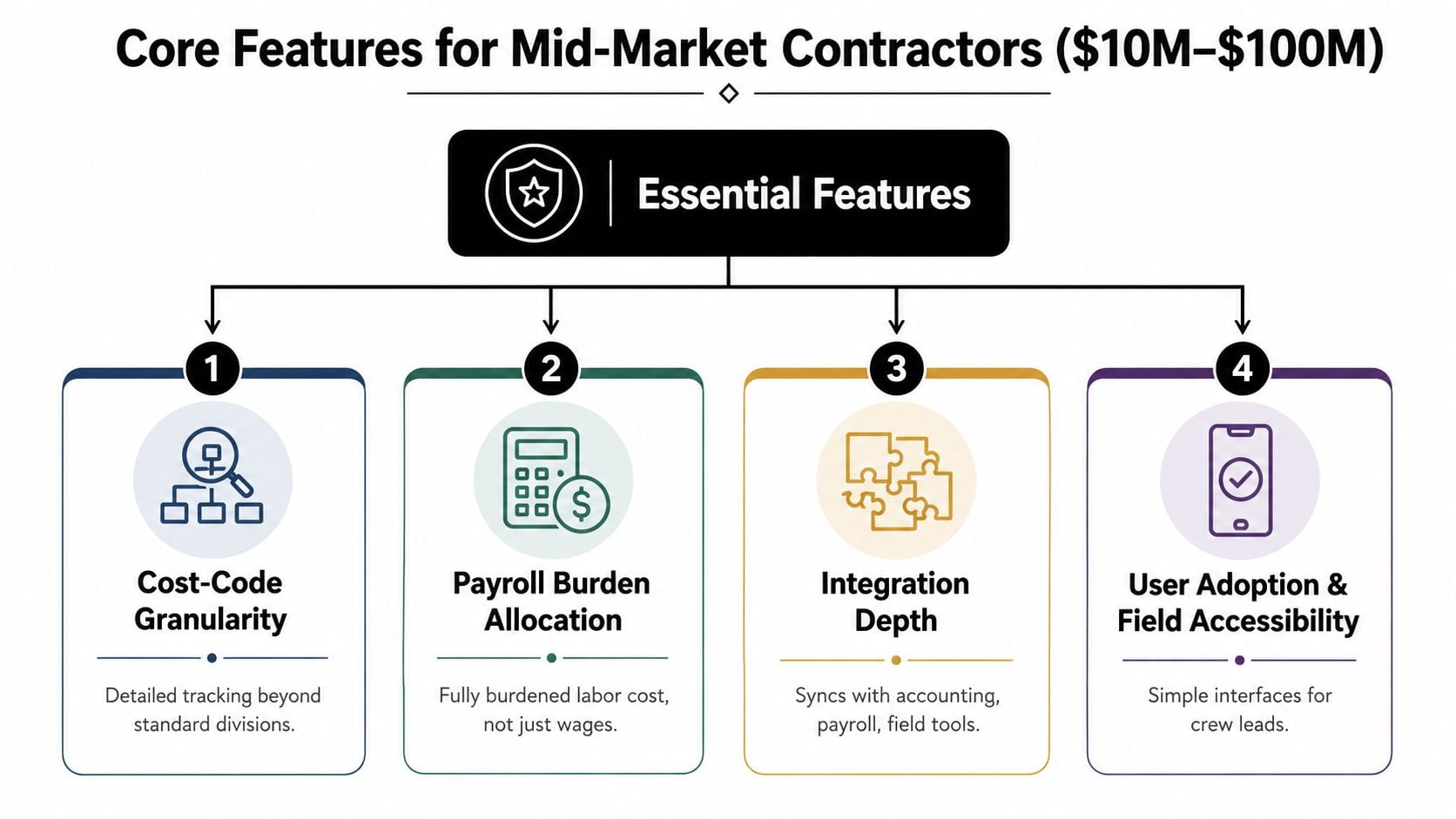
For a contractor with USD 10 million to USD 100 million in annual revenue, features should be ranked by whether they improve weekly control. A feature that produces a polished report after close is less valuable than a basic workflow that captures a labor hour or subcontract commitment correctly at the source.
Essential features
Cost-code granularity is first. The platform should report by job, phase or package, cost category, and line item. If a project manager can see only total job spend, the software won't explain whether the variance came from overtime, material waste, equipment utilization, or a subcontract scope issue.
Payroll burden allocation is essential. Base wages understate labor cost when payroll taxes, workers' compensation, and benefits aren't assigned to the job. Construction job-costing systems should allocate actual indirect labor costs to the correct job, phase, and cost code so burden rates and overhead allocation remain accurate (Miter's labor burden guidance).
Change order tracking deserves the same priority. The system should distinguish proposed, approved, billed, and collected change orders. Otherwise, a PM may believe the job has recovered its cost when the related revenue remains unapproved or unbilled.
Retainage must be a separate receivable. Retained amounts are not cash, and they shouldn't disappear into a generic accounts receivable balance. The system needs to track withheld balances separately from billed revenue and cash received because collection depends on closeout and final acceptance (BeanCount's construction WIP guidance).
Required financial workflows
A contractor performing progress billing needs AIA-style functionality. The software should convert the schedule of values into an application for payment, support percent-complete billing and stored materials, incorporate approved change orders, and show retainage line by line. Retainage is commonly held at 5% to 10%, so mishandling it can distort both receivables and cash planning (Vynce Digital's contractor invoicing guidance).
WIP reporting also belongs in the essential category. Under the cost-to-cost percentage-of-completion method, percent complete equals costs incurred to date divided by estimated total cost, while earned revenue equals percent complete multiplied by total contract value (BlackPeak CFO's WIP accounting guide). Your system should make those calculations traceable to source transactions, not dependent on a spreadsheet maintained by one person.
Useful, but secondary
Mobile access, configurable approvals, document attachments, and automated reminders matter because adoption affects data quality. Advanced artificial intelligence, elaborate dashboards, and decorative workflow automation are distractions if the platform can't reconcile field time, payroll, AP, and the GL.
Use the same discipline for reporting that you apply to the system itself. A practical framework for turning financial data into decisions appears in this guide to data analytics for finance.
How to Choose the Right Vendor for Your Operation
Don't choose from a feature grid. Choose from a workflow demonstration. Ask each vendor to process your actual transactions, with your cost codes, approval rules, payroll structure, and billing requirements.
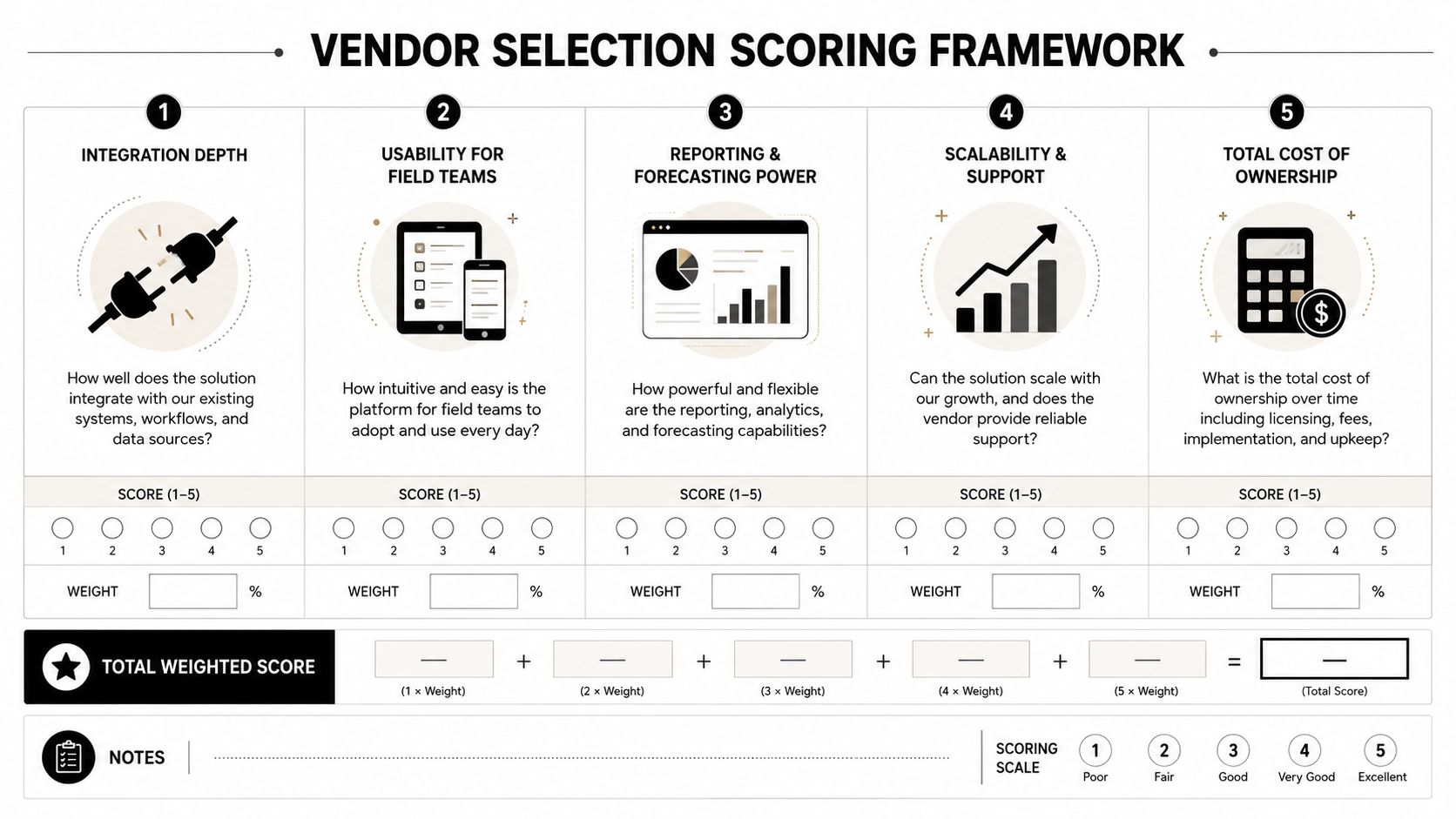
Score each vendor across five areas:
| Evaluation area | Demo question | Red flag |
|---|---|---|
| Integration depth | Can field time, payroll, AP, purchase orders, and the GL exchange coded data without re-keying? | The vendor relies on exports, imports, or nightly manual reconciliation |
| Construction specificity | Show retainage, WIP, committed costs, change orders, and progress billing in one workflow | Construction requirements require custom workarounds |
| Reporting granularity | Can the report filter by job, phase, cost code, and cost type? | The dashboard stops at total job cost |
| Total cost of ownership | What will implementation, training, cleanup, integrations, and ongoing support require? | Pricing excludes services needed for usable data |
| Vendor viability | Who owns implementation, product support, and integration maintenance? | No clear answer about customer support or product direction |
The most revealing demo question is specific: “Show me how a labor burden rate of 32% flows to a job when overtime is involved.” Don't accept a slide deck. Watch the transaction enter the system, move through payroll, hit the job cost report, and affect the forecast. Then ask how the system handles a corrected time card.
Test the exceptions, not just the happy path
A good vendor should demonstrate a misclassified invoice, a rejected change order, an unapproved purchase order, stored materials, a subcontractor bill with retainage, and a late time-card correction. Those exceptions expose whether the platform reflects real construction operations or only a clean sales demonstration.
You should also calculate the hidden cost of data cleanup. A low subscription price won't compensate for rebuilding cost codes, correcting historical jobs, or forcing PMs to maintain disconnected spreadsheets. Vendor viability matters because your company will depend on integrations and support long after implementation.
A construction-focused advisor can help translate operational requirements into finance controls. See how a construction accounting consultant can support that evaluation.
Implementing Job Costing Software Without Derailing Operations
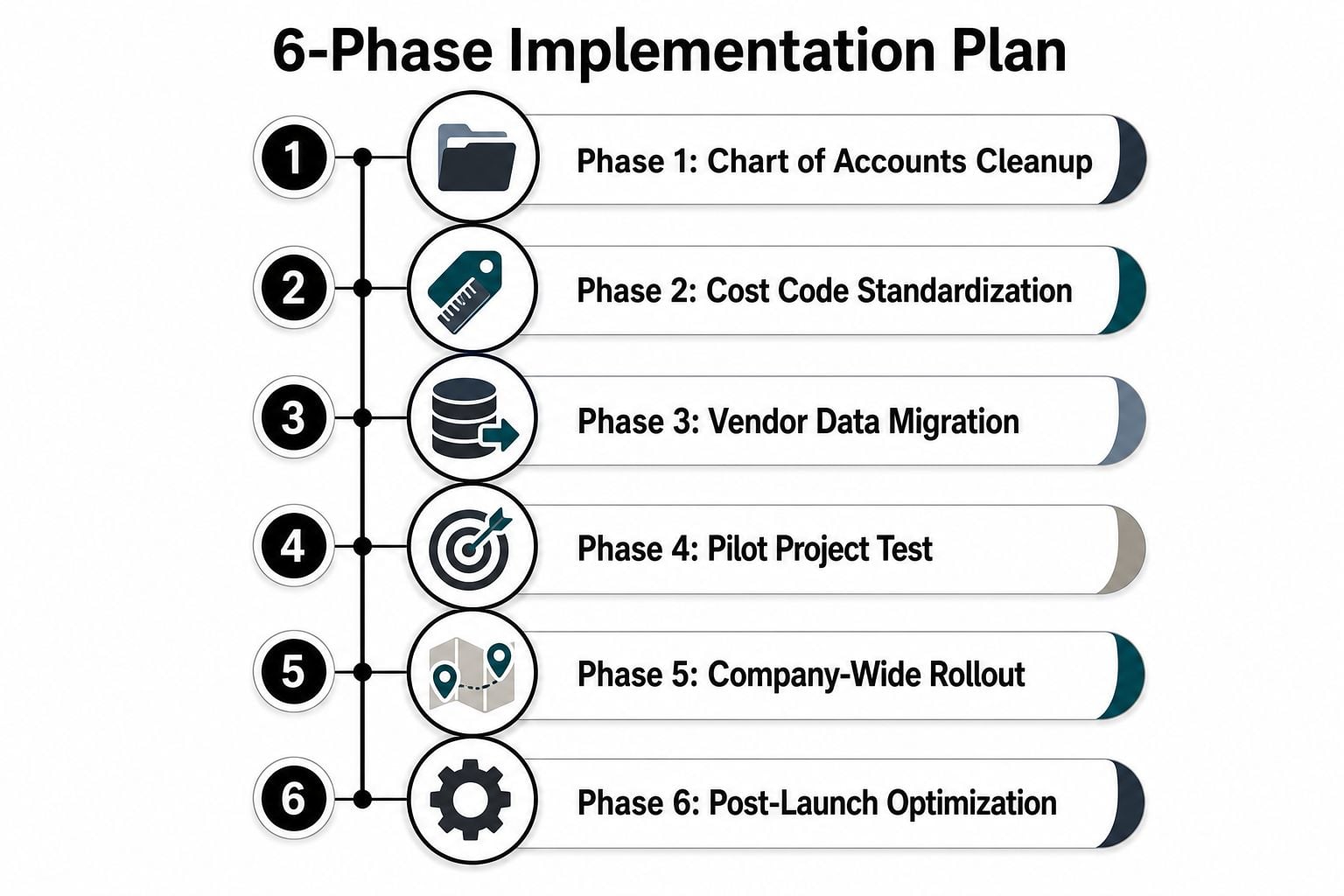
Implementation fails when leadership treats it as an IT installation. It's a redesign of how people estimate, buy, approve, code, pay, bill, and review work. Keep the sequence practical.
- Clean the chart of accounts. Remove duplicate accounts, clarify indirect costs, and decide what belongs in job cost versus overhead.
- Standardize cost codes. Map the estimate and work breakdown structure to the codes used by payroll, AP, purchasing, and reporting.
- Migrate usable historical data. Bring forward the job, estimate, commitment, actual-cost, billing, and retainage information required for active projects and trend analysis.
- Test integrations. Send field time, payroll, purchase orders, AP invoices, and corrections through the full transaction path. Confirm that each record lands on the right job and code.
- Pilot one project. Select a job with active field work and a responsive PM. Don't start with the company's most chaotic project.
- Roll out with operating rules. Define who codes time, who approves invoices, when commitments are updated, and who reviews variances.
- Stabilize through weekly reviews. Use the first month after launch to inspect exceptions, missing data, late entries, and unexpected mapping behavior.
- Optimize only after adoption. Add dashboards and automation after the core data flow works consistently.
Run a reconciliation test before go-live
Take one real labor transaction, one material purchase, one purchase order, one subcontract bill, and one change order. Trace each from field or AP entry to payroll, the accounting ledger, the job-cost report, and the WIP schedule. If the totals don't reconcile, don't launch.
The market's deployment history supports a cloud-first direction. One market study reports that cloud-based deployment held 58.3% of the market in 2025, while North America represented 40.2% of global revenue in 2025 (Mordor Intelligence construction ERP analysis). Cloud access helps distributed teams, but it doesn't solve poor coding or weak approval design.
Your implementation plan should also protect cash. Connect billing, retainage, collections, and committed costs to the same review cadence used for project variance. The construction cash flow management guide provides a useful operating reference for that discipline.
The Failure Point Most Vendors Will Not Talk About
The most common failure isn't a missing dashboard. It's data latency.
A PM sees labor after payroll closes. The subcontractor bill appears after AP processes it. Purchase orders remain outside the job-cost view until someone matches them manually. By the time the report reflects the full cost picture, the team is reviewing a historical problem instead of preventing an active one.
Disconnected workflows create predictable failures:
- Duplicate entries: Office staff re-key field purchases because the original transaction doesn't flow through.
- Misclassified codes: A cost lands on the job but in the wrong phase, making both the job and the phase report misleading.
- Delayed postings: Actual costs appear after the PM has already made a staffing or purchasing decision.
- Time-card lag: Unreconciled hours understate labor cost and distort the cost-to-complete view.
- PO matching errors: Committed costs aren't connected to invoices, so management sees a partial obligation.
These aren't cosmetic data issues. They change the apparent margin, the WIP position, and the cash forecast. A contractor may postpone corrective action because the dashboard says the project is on budget, while the field and AP systems already contain evidence of an overrun. The workflow has turned the dashboard into a rearview mirror.
The right buying question isn't “Which software is best?” It's “Which workflow gets reliable field, accounting, and project-control data into one decision process quickly enough for weekly action?”
Before signing a contract, document the time from field entry to approved job-cost posting for labor, materials, purchase orders, subcontractors, and change orders. Then identify every manual handoff. If the vendor's solution leaves those handoffs intact, the brand won't fix the control problem.
The KPIs and ROI Metrics That Prove the Software Is Working
A job costing system earns its place when it changes decisions. Put the following measures on a weekly dashboard and assign an owner to each one.
| KPI | Formula | Healthy benchmark | Action when off |
|---|---|---|---|
| Gross margin by job | Contract revenue minus projected total job cost, divided by contract revenue | Compare target margin with current forecast and investigate every material variance | Reforecast the job, review production assumptions, and escalate scope or pricing issues |
| Cost-to-complete variance | Current estimated cost to complete minus the approved or prior estimate | Variance should be explainable by identified scope, production, or pricing changes | Rebuild remaining-cost assumptions by phase and cost code |
| WIP over or underbilling | Billings to date compared with earned revenue under the cost-to-cost method | Position should reflect actual progress and approved billing terms | Review billing cadence, cost capture, change orders, and estimated total cost |
| Labor burden accuracy | Actual burden applied to jobs compared with payroll taxes, workers' compensation, and benefits incurred | Applied burden should reconcile to actual indirect labor costs | Update burden logic and correct affected jobs |
| Change order margin capture | Margin from approved change orders compared with the margin originally priced | Approved changes should preserve the intended margin | Review pricing, approval delays, and unbilled scope |
| Days of cost lag | Date of field or vendor activity compared with date posted to the GL | Keep the lag short enough for weekly variance management | Fix the specific integration, approval, or reconciliation bottleneck |
The WIP row deserves special attention. Under the cost-to-cost method, costs incurred to date drive the completion percentage, and that percentage drives earned revenue. If cost data arrives late, the WIP result can be wrong even when the accounting calculation itself is correct.
Calculate payback from prevented leakage
Use a simple model:
Potential margin preserved = annual work under management multiplied by preventable margin leakage.
For example, if better visibility prevents a 3% margin leak on a USD 5 million book of work, the protected margin is USD 150,000. The arithmetic is straightforward, but the assumption must be tested against your own jobs and historical variance. The relevant source for the hypothetical inputs is the construction job-costing guidance supplied by the scenario, not an external performance study.
Don't claim software caused the improvement until the dashboard shows the operating change. Track whether PMs review variances earlier, whether burden reconciles, whether approved changes reach billing, and whether committed costs appear before invoices. That evidence supports both ROI analysis and management accountability.
How a Fractional CFO Uses Job Cost Data Beyond the Job
Job cost data earns strategic value when it moves from project reports into the owner's cash, margin, and exit decisions. A dashboard that updates after the money has moved is a rearview mirror, not a control system.
Start with the 13-week cash flow forecast. Use active-job data to project billings, collections, retainage releases, payroll, subcontractor payments, equipment costs, and vendor obligations. WIP and billing cadence separate earned revenue from likely cash timing. Group accounts receivable by customer and expected collection date, rather than treating it as one company-wide balance.
Use the same data to test customer and contract profitability. Roll job margins up by client, project type, geography, superintendent, and contract structure. A client with attractive revenue but recurring change-order disputes and slow retainage collections may contribute less value than the income statement suggests. That result should guide renewal decisions, contract renegotiation, and the work your team stops pursuing.
Job cost data also supports exit readiness. Buyers and successors will examine job-level margins, backlog quality, WIP schedules, customer concentration, and forecast reliability. Clean cost codes and reconciled project records connect reported earnings to operating evidence. They also give an owner a defensible explanation for margin changes, repeatable contract types, and remaining risks.
A fractional CFO applies this information beyond a controller's close and compliance responsibilities. The controller records transactions correctly. The CFO connects those transactions to hiring, equipment purchases, contract selection, borrowing needs, cash timing, and the transition plan. AmbitionCFO provides 13-week cash flow modeling, job or client margin analysis, forecasting, KPI dashboards, and exit planning for founder-led companies.
Run a practical data audit this week. Export active-job cost codes, estimates, committed costs, actual costs, billings, and retainage balances. Mark every field that arrives late or requires manual re-keying. Use that list to score vendors and build a forecast that reflects when information becomes usable, not merely when work occurs.
AmbitionCFO helps construction owners connect job costing with 13-week cash flow forecasting, margin analysis, KPI reporting, and exit planning. Visit AmbitionCFO to discuss your current cost-code structure and identify workflow gaps that are hiding cash and margin risk.